
Why Organizing Your Photos Matters
Your phone may hold thousands of photos, including family memories, travel snapshots, screenshots, downloads, and accidental duplicates. When everything stays in one large camera roll, finding a specific picture can become frustrating.
A simple photo organization system can help you:
– Find important photos faster
– Free up storage space
– Protect memories with backups
– Remove duplicates and blurry images
– Create albums for special events and people
– Enjoy your photo collection instead of avoiding it
You do not need to organize everything in one afternoon. Start with a small section of your library and build a routine that works for you.
Start With a Quick Photo Cleanup
Before creating albums or changing settings, remove photos you no longer need. A quick cleanup makes the rest of the process easier.
Delete obvious clutter
Look for photos that have little long-term value, such as:
– Blurry or dark images
– Accidental photos of the floor or inside of a pocket
– Multiple pictures of the same subject
– Screenshots you no longer need
– Old shopping lists, receipts, or notes
– Downloaded images that you saved temporarily
– Short videos that did not turn out well
Many phones have a “Recently Deleted” or “Trash” folder. Deleted photos may remain there for a set period, so check this folder after your cleanup if you want to remove them permanently and recover storage sooner.
Use the keep the best rule
When you have several similar photos, choose one or two favorites. Consider keeping the photo with the clearest focus, best lighting, and most natural expressions.
You do not have to keep every version of a moment to remember it. A smaller collection of meaningful photos is often easier to browse and share.
Create Simple Albums
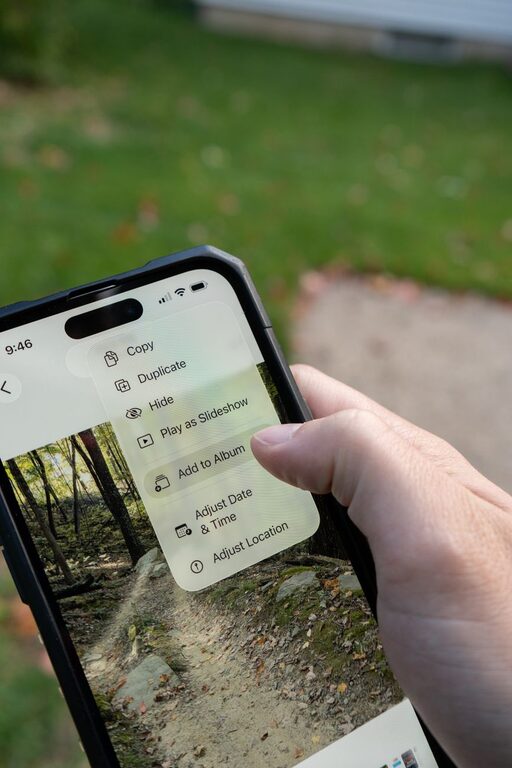
Albums give you a way to group photos without changing the original camera roll. Keep your system simple so you will actually use it.
Useful album ideas include:
– Family
– Friends
– Trips
– Pets
– Home projects
– Food
– Nature
– Celebrations
– Favorite photos
– Documents to keep
You can also create albums for specific events, such as “Summer Vacation 2025” or “Graduation Party.” Use names that are clear and easy to search later.
Avoid creating too many detailed albums. If every small occasion has its own folder, organizing may begin to feel like work. Start with broad categories and add more only when you need them.
Organize Photos by Date and Event
Most phone photo apps automatically arrange pictures by date. This makes it easy to scroll through recent memories, but event-based organization can make important photos easier to find.
For example, instead of relying only on the date, create an album called “Weekend at the Lake.” Add the photos from that event, then include a few of your favorites rather than every image.
When naming albums, use consistent wording. You might choose this format:
Year Event Location
Examples include:
– 2025 Birthday Chicago
– 2024 Beach Trip
– 2023 Family Reunion
Consistent names make albums easier to scan and search.
Take Advantage of Search Features
Modern photo apps often include search tools that can identify dates, places, objects, and people. You may be able to search for terms such as “beach,” “dog,” “birthday,” or “screenshots.”
Search features vary by phone and app, but they can save time when you are looking for a particular image. You can also add captions, descriptions, or favorites to photos that are especially important.
Try searching for:
– A city or travel destination
– A person’s name
– A month or year
– A type of object, such as flowers or cars
– A holiday or event
– A photo format, such as videos or screenshots
Search tools are helpful, but they are not always perfect. Use albums and clear names as a backup.
Handle Screenshots and Downloads
Screenshots and downloaded images can quickly fill your photo library. They are useful in the moment, but many become unnecessary after a few days.
Create a regular habit for reviewing them. Once a week or once a month, open the screenshot and download folders and ask:
– Do I still need this?
– Is the information saved somewhere else?
– Should I move this image into an album?
– Can I delete it now?
If you use screenshots for recipes, travel details, instructions, or event information, consider moving the information into a notes app. This keeps your photo library focused on memories and images you want to keep.
Back Up Your Photos
A backup gives you another copy of your photos if your phone is lost, damaged, or replaced. Many phones offer automatic cloud photo backups through the device’s built-in services or a photo storage app.
Check the backup settings on your phone and confirm:
– Photos are uploading automatically
– Videos are included if you want to save them
– The correct account is connected
– Backup happens over a suitable internet connection
– You have enough storage space
– You can view your photos from another device or web browser
A backup is not the same as organization. Even if your photos are safely stored online, you may still want to delete duplicates, create albums, and label important images.
For especially valuable photos, consider keeping a second copy on a computer or external storage device. Review your backup plan occasionally to make sure it is still working.
Free Up Phone Storage Carefully
Photos and videos can use a large amount of phone storage, especially high-quality videos. After confirming that your photos are backed up, look for storage tools in your phone’s settings or photo app.
These tools may help you find:
– Large videos
– Duplicate photos
– Blurry images
– Old screenshots
– Unused downloaded files
Review suggestions before deleting anything. Automatic cleanup tools can be useful, but you should always check the selected items if the photos are important.
You can also adjust camera settings if your phone offers different image or video quality options. Higher quality can be useful, but it also creates larger files.
Build a Simple Maintenance Routine
The easiest way to keep your photo library organized is to do a little maintenance regularly. A short monthly routine may include:
- Delete blurry photos and duplicates.
- Review screenshots and downloads.
- Add important photos to albums.
- Check that backups are working.
- Review phone storage.
You can also organize photos immediately after a large event. After a vacation, celebration, or special gathering, choose your favorite images while the event is still fresh in your mind.
Do not aim for a perfect library. Aim for one that is easy to search, safely backed up, and filled with photos you genuinely want to keep.
Final Tips for Staying Organized
Keep your photo system as simple as possible. Use a few broad albums, delete obvious clutter, and rely on search when appropriate. Avoid spending too much time sorting every image into a precise category.
Most importantly, make organization part of your normal phone routine. A few minutes each week can prevent thousands of unsorted photos from building up again. With regular cleanup and reliable backups, your phone becomes a convenient place to store and enjoy your favorite memories.